Showing posts with label Technology. Show all posts

Thursday, September 12, 2019

Nirvana's New Auto-Pilot!


Over a year before this installation, we ordered the Raymarine EV-100 autopilot for Nirvana. With plans on sailing long passages, we figured we'd take the advice of other cruisers and make our lives simpler when sailing all day. With the autopilot, we can free ourselves from standing at the helm for hours on end.

When finally opening the contents, we found four components .. with four manuals! The installation wasn't real difficult, but with the different manuals and components it took patience. One thing that we wished we'd had known before ordering & starting the installation ... the EV-100 autopilot requires SeaTalk cables between its four components. One cable was provided, but it wasn't long enough to do anything so we needed to purchase the SeaTalk Spur cable. It's a bummer when you finally get ready to tackle a project and realize you don't have all the parts! Hopefully, this post will prevent others from learning the hard way.

As I mentioned, we ordered the EV-100 over a year before installing it and we installed it around November, 2018 .. I'm really doing a poor job of keeping this blog up! Now that I'm finally writing about the installation .. my mind is a blur. Honestly, I can't remember all of the installation details, so I'm gonna give you the basics .. sorry!

Ken installed the gray control unit in the aft cabin, where he also added the sensor core. The aft cabin seemed like the logical place for our situation, with it being in between the cockpit and our electrical panel. The wheel drive was easily added to our wheel in the cockpit, and the p70 control head was also added in the cockpit by running wire up our steering column .. not so easy, but we got it done. During the installation process, Ken did make a couple of calls to Raymarine for assistance. I can say that we were very happy with their customer service! 


A close up of the sensor core ...


The sensor core in the aft cabin .. near the companionway. The control unit is just below and to the right of our dinghy oars (notice how we added straps to store them, along with our boat hook).


With the components installed, our cockpit now provides the autopilot, a compass & an older Lowrance GPS. There were two more things we needed to do before our installation was complete .. we needed to program the unit's "hard over" time and we needed to take the boat out on the water to calibrate the unit. For those with a Catalina 30, we set the hard over time to "10".  Once everything was hooked up & programmed, we were finally ready for calibration on the water .. but this wouldn't happen for another 8 months! Yep, we were distracted by Puerto Rico. Once we were back home, we finally took Nirvana out on the water and calibrated the autopilot this past July. Luckily, the directions were easy, our hard over time seemed correct, and everything went as hoped. We finally have a working autopilot on Nirvana!


It was so good to get back on the water! We've got more projects (and sailing) to write about, but that's for another time.

Hasta luego ... until then. Mid-Life Cruising!

Tuesday, September 30, 2014

How to Transfer Between Cloud Files ... Quick, Easy and Free!


A while back I discovered SkyDrive (now called OneDrive), a place to store files "in the cloud" for free (up to 15GB).  I thought this would be a great place to back up this site and store our music files.  I can't imagine losing everything on this blog, or all of our music!  Ken and I have grown up listening to songs from the 60's and 70's, as well as the "oldies" from the 50's.  As we grow older, music continues to be an important part of our lives and we enjoy most of today's music too.  We don't like rap, country or some of the teeny-bopper bands, but we like the good stuff!

After downloading over 800 songs a little at a time, I've continued to upload new music files as I got them.  I've had no complaints with SkyDrive, but was getting a little nervous about the limit of 15GB of free storage (although much better than the initial 7GB).  Our music files are at about 8GB right now and I plan on storing movie files in the future, which could quickly eat up the rest of the available storage.  So when Google's cloud, Drive, gave me an extra 50GB of free storage (for a total of 65GB) after activating my very first smart phone this month (woo hoo!), I wondered if it was possible to quickly copy my music files from one cloud to another.

After a bit of research, I came across Cloudsfer, a free online service (first 10GB then a fee) that doesn't require any downloads and quickly moves and/or copies your files from one cloud to another.  I figured I'd give this a try, and it worked!  It was very easy, and I was able to copy all of my music files in just over an hour.  An hour was a lot less time than I'd spent downloading all the files to SkyDrive!  Now I can keep all of my music and future movie files in my Drive cloud, while keeping my SkyDrive storage for documents and backing up this site.  I may even store my photos there, but so far I've been happy with Photobucket for that.

So, if you want to move your cloud files around or copy them to another cloud (even a friend's cloud with their account/password information), Cloudsfer is a great solution!  With all the free cloud storage sites and the ability to move or copy files, I don't see the point of paying for cloud storage.
.
BTW, wanna know how to record online music for a one-time payment of $20?!  It's how we've gotten most of our music (we do support our favorite musicians when we can), and I've written a post here.  We've been using this for a couple of years and love it.  

Wanna listen to your own music on your smart phone without taking up precious storage space?  Look for a post real soon about an app I found that allows us to stream all of our music files directly from the "cloud" to our new smart phones!

Hasta luego ... until then.  Mid-Life Cruising!

Friday, September 26, 2014

Entering The Android World .. Without Breaking the Bank!


It's been a while since I've written a "Frugal Fridays"* post, but whenever I learn about something that could save you money I wanna pass it on.  I'd been avoiding replacing my old flip-phone with a smart phone for years, but after all this time I finally did it ... and my phone bill is cheaper now!

If you've followed this blog for a while, it won't surprise you that the main reason I avoided a smart phone was the price.  There's no way I'm gonna spend big bucks for a phone.  Even if I could get a smart phone really cheap with a contract, I wasn't about to spend another $40 a month on top of the basics for a data plan.

Another reason I avoided a smart phone ... the contract that I mentioned.  Both Ken and I have been eligible for an upgraded phone with AT&T for over a year now, but we'd have to sign another 2-year contract ... no thanks!  With our hopes of living together on our sailboat soon, we'll only need one phone and we don't want to be stuck in a contract when that happens.

So, what finally changed my mind?  For the past few months my phone would die after more than 3 minutes into a conversation ... even with a full charge.  I had to do something, but I wasn't thrilled about paying a $50 deductible to use the insurance policy for my piece-of-crap phone.  Looking back, I should have dropped the $5 monthly fee for the insurance a long time ago.  Then, I saw a commercial for Cricket!  No, not the insect but the pre-paid wireless company that AT&T recently bought out.  I'd never heard of Cricket until I saw the commercial, but the promise of a free or inexpensive smart phone without a contract and a cheap monthly price got my attention.  After researching the company and learning that they're now owned by AT&T, I started taking the thought of transferring to Cricket a little more seriously.  The coverage would be the same as AT&T, which we've been very happy with the past few years ... even in the Virgin Islands and Mexico.    

My new Motorola MotoG!

A few weeks later, Ken and I are now with Cricket Wireless and we each have a new smart phone.  Ken chose the Nokia Lumia 630 with Windows 8 and I chose the Motorola MotoG.  The MotoG has the new KitKat operating system and 8GB of storage.  It doesn't have a SD card slot but it came with an offer of 65GB of "cloud" storage on Google "Drive" when activated.  That's plenty enough storage for me.  After the $50 rebate that was offered, Ken's phone was free and mine was $50 ... the same as I would have paid for that insurance deductible.  What's even better ... for $45 each (with AutoPay) we get unlimited calls, texts and 3GB of data (each line) on our phone.  We're saving about $40 per month, and we have smart phones too!  There's no contract and we can change our plans every month,  There's a cheaper plan of 1GB for $35 and a more expensive plan of $55 for 10GB of data!  You can even change your plan in the middle of a cycle (up to 2 times) and get a credit or additional charge, depending on if you choose a smaller or larger plan.  In fact, I've already lowered my plan to $35 for 1GB since I'm always around WiFi.  What happens if I go over my data plan?  I doubt I will, but if so I don't get billed more or lose my data for the rest of the month ... instead it just slows down.

I told our daughter about this, and she now has a Cricket account as well.  (It would have been even cheaper if she'd joined our account as Cricket gives a discount for every line added, but she's married now).  She wanted to keep her Samsung Galaxy, so she paid only $10 to buy a new SIM card.  Although AT&T charged her $180 early termination fee (she was still in contract), she'll save that much in just a few months.  So far, we're all happy!  

Oh, and after a year of paying on time and having at least one of us on the mid-range or highest data plan we'll each get a $50 credit for a new phone.  We get one every year, and if not used it will be added to the next year's $50.  I wish I got a commission from Cricket (I don't), because I sure do love their product so far!  Yes, I read some terrible reviews online about customer service, but we've been happy.  I went to a local store to buy my phone, and Ken ordered his online.  Both experiences were good, and although buying at a store instead of online generally means a $25 activation fee ... the guy waived mine and gave me a great discount on a heavy duty phone case!

Wanna know how to save another $25?  If I share your email as a referral and you activate within 30 days, then we'll both get a $25 credit after you've been a paying customer for two months!   So, if you wanna join and get a credit just email me privately (top of our site) with your email address and we'll both benefit.  Although we're happy, I can't make any guarantees. So, I'd suggest that you look at their coverage map first to be sure you're happy with what you find.  Here in Louisiana, we haven't had any problems.

Although I was reluctant to own a smart phone, I must admit that I LOVE  it!  I'm now able to easily check my email, research something real quick, and even use my phones as a GPS.  I've already learned a few new things that I'll be sharing soon in future posts, including streaming your own music files directly from your "cloud" and quickly/easily transferring and/or copying files from one cloud account to another.

Our laptop computer is old and soooo slow, so our phones are much handier.  If it weren't for writing these posts on our blog or Ken's need to type an invoice for his business, we'd probably never use our laptop anymore!  I've yet to add the "Facebook" app on my phone, but I can see how it would make posting to our page so much easier.  Now I know everyone's secret!  I'm sure I'll add the app once we're working on the boat and living aboard, but for now I'm trying to resist.  Ken doesn't have a Facebook account, and I try to make a point of not looking at Facebook on the weekends or evenings at home.  It's good to "disconnect" for a while.

Hasta luego ... until then.  Mid-Life Cruising!

*For those that missed the other posts of this series, check them out below:

Friday, May 11, 2012

Frugal Fridays - Free Cloud/File Storage!


Today's technology is amazing!  Nowadays, one can download a ton of photo, music and video files to a computer.  Before I started this blog, I really didn't mess with computers much.  I never took advantage of digital cameras or the ability to download music.  However, this blog inspired me to start taking pictures and learning how to download and record music.  I now have a ton of photos and music stored on our computer, and I often worry about losing it all.

I've heard about "cloud" storage, but the few I've come across charged more than I wanted to pay.  Remember, I'm really frugal so $60 a year isn't something I consider "cheap".  I wanted something that was either free or really inexpensive.  Just yesterday, I came across something that may just be the solution!  It's called SkyDrive, and it stores up to 7GB of files on your PC, laptop and smartphone (we don't have one of these yet) for free!  The files can be accessed from any of your devices and there's no syncing or cables required.  It works on Windows and Mac, and if you need more storage you can purchase an additional 20GB, 50GB, or 100GB for $10, $25 or $50 per year.

I have been thinking of file storage, backing up files, and preventing the loss of this site for a while now.  Whenever I do ... my head starts spinning!  I've thought about purchasing an external hard drive to store all of our photos and music, as I've often imagined our ipod falling into the water or our computer crashing!  I've learned how to back up my site and save it to a file, so I'm thinking that SkyDrive may be an easy way to insure that I don't lose this site, our music and our photos.

As I've mentioned in the past, I'm self-taught and really only know the basics about all this stuff.  I'm going to download SkyDrive today and start using it.  I hope this may also be a solution for some of you too!  If you're familiar with this service, I'd love to hear your thoughts, opinions or suggestions on this topic.

Speaking of saving pictures, I've been going through all of our pictures from our recent vacation.  We had such a great time, and I'll have more posts and pics of our vacation next week.

Hasta luego ... until then.  Mid-Life Cruising!

*For those that missed the other posts of this series, check them out below:

Wednesday, March 21, 2012

Installing Lowrance Chartplotter Transducer

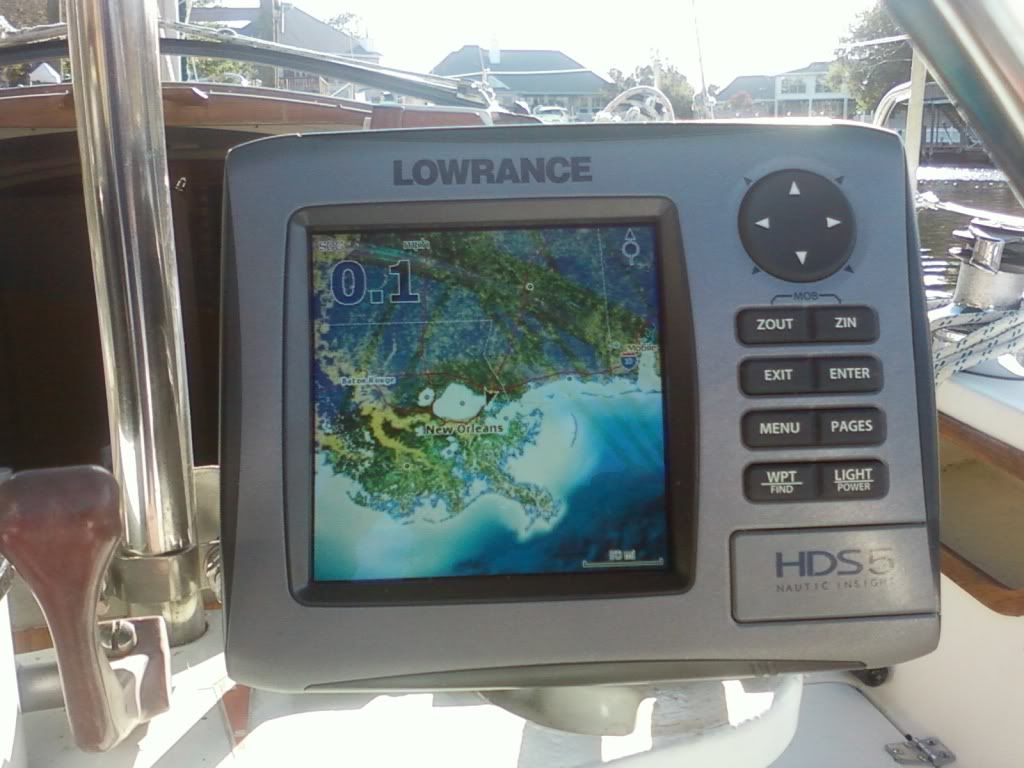
Do you see the black cursor right above New Orleans?  That's our home!

A while back, we got a great deal on a Lowrance HDS-5 GPS/Chartplotter and also a while back we installed the depth transducer.  While we need to tackle learning how to read the thing (so many symbols on that map), we first needed to tackle getting it installed!  The Lowrance model that we purchased came with a depth finder, which meant that we (Ken) needed to install a depth transducer.  For those that don't know what a transducer is ... it's a little device that reads the water's depth (as well as other things) then sends the information to our GPS screen.

This really stressed Ken out, as he wanted to make sure he placed the transducer in the best place possible without catching interference from the strut, keel or anything else that may get in the way.  When reading the info that Lowrance provided, it all pertained to motor boats.  It discussed how to install the transducer on the transom ... no help!  We needed to use the "through-the-hull" installation, meaning that the transducer would be on the inside of the boat and reading through the hull. 

Nirvana already has a depth transducer near the bow, under the v-berth.  We debated about whether to also install the new transducer near the bow and remove the older transducer.  However, running the wires up to the front of the boat was not something Ken really wanted to tackle if not necessary.  Plus, why not keep the older transducer installed as a back-up?  When considering placing the transducer towards the rear center of the boat (back of galley), I worried that we would not have enough notice of shallow land and therefore run aground easier.

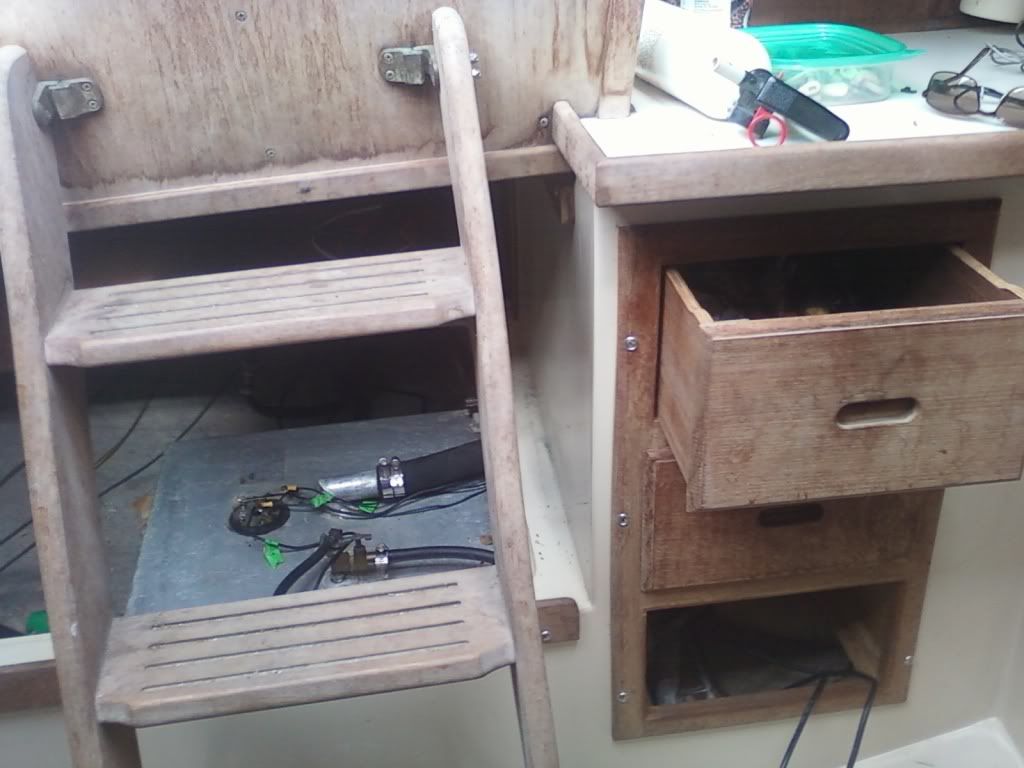
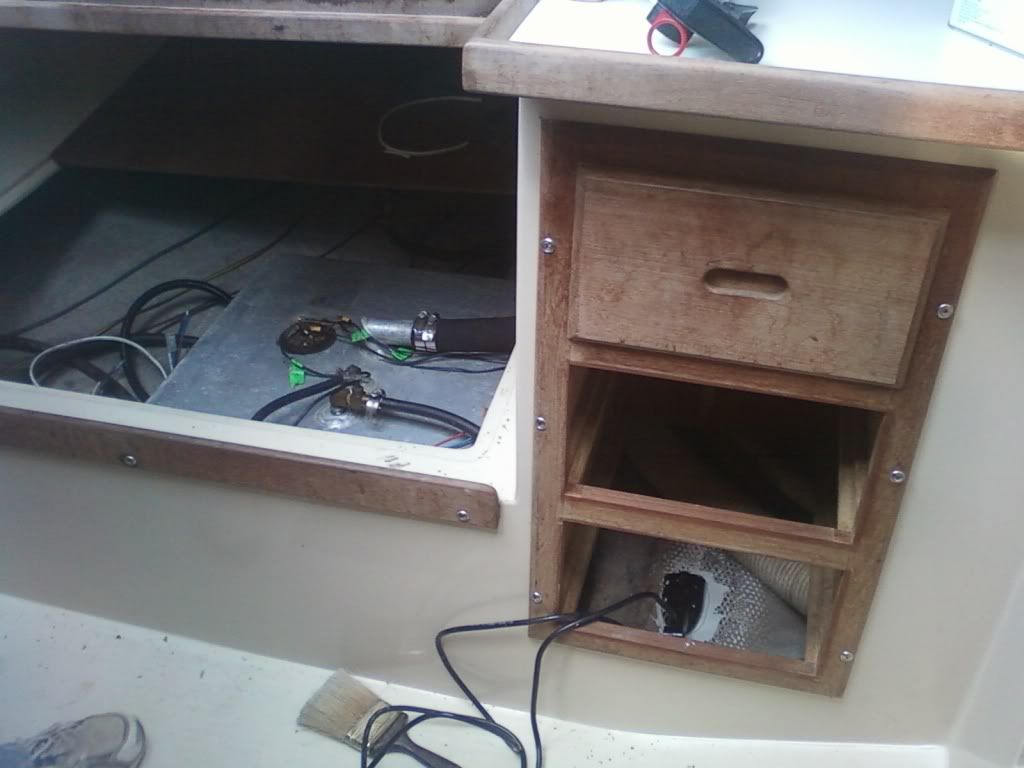
After way too much thought we agreed to place the transducer towards the back of the galley, underneath a cabinet.  This location is pretty much at the back end of the center of the sailboat, right at the start of the cockpit.   It seemed that there wouldn't be any interference, and Ken convinced me that with the slow pace of the sailboat a few feet wouldn't make a huge difference in measuring the depth.  Plus, we'll still turn on the old depth finder which will give us a reading from the bow.

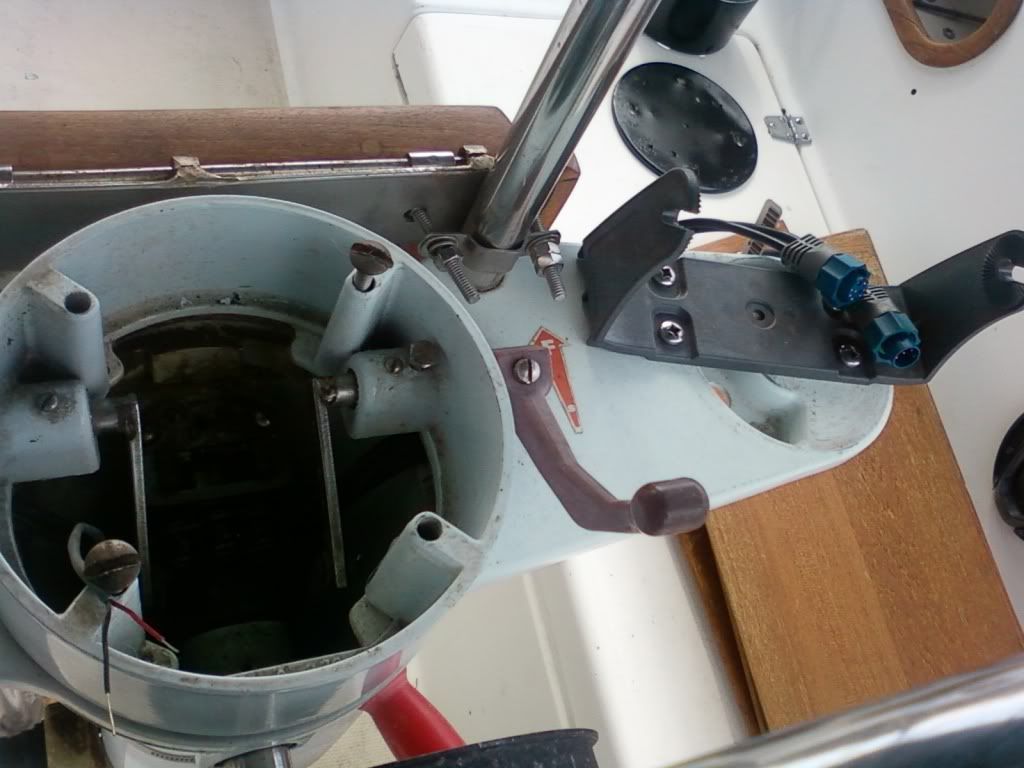
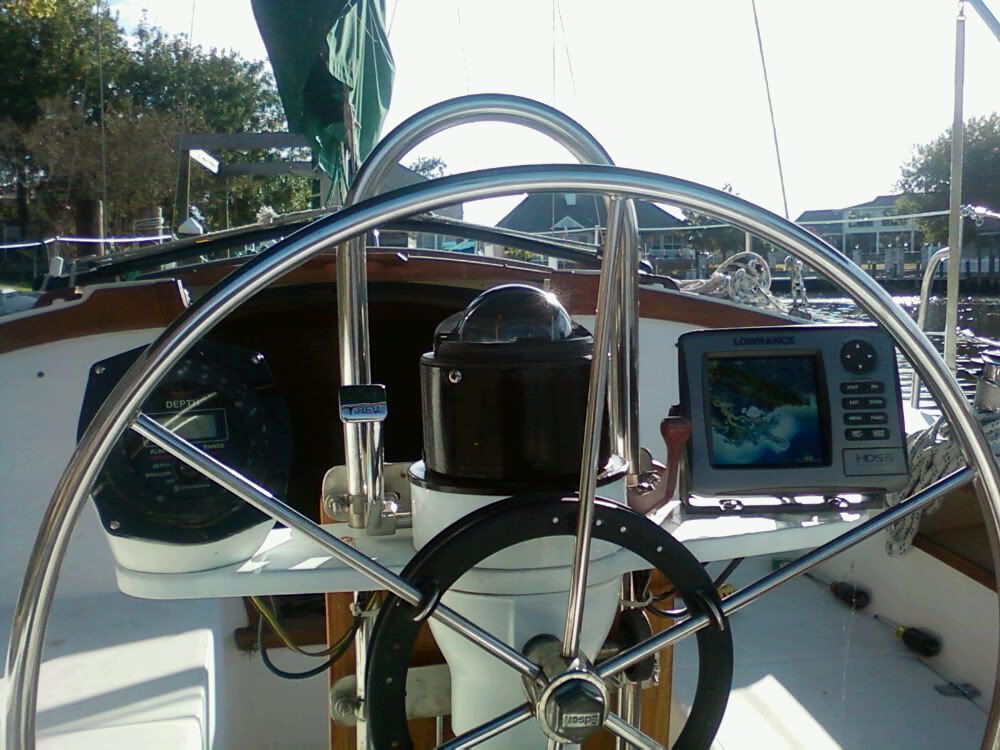
Ken removed the compass, an older transducer, and some instrument that never worked from the steering column then ran wires (with my help) down the column and into the existing terminal block in the aft cabin.  From there, Ken connected the wires from the newly installed transducer.  While Ken had the steering column torn apart, he was also able to fix the light on the compass which had never worked ... he's so smart!  Also, he painted the bottom of the compass black to give it a newer and cleaner look.

Aft cabin with cushions removed 

 View of steering column

Left picture shows the aft cabin with cushions removed, fuel tank and wires exposed and transducer installed.  Right picture shows the steps in front of part of the aft cabin and leading into the cockpit, plus the galley cabinets where the transducer was placed underneath.  (We really need to tackle the interior teak)!

After mixing up a batch of Marine Tex, Ken covered the back of the transducer with a thick layer of the marine epoxy, added a layer to the inside of the hull, and prayed we were doing the right thing as he pressed the transducer into the thick goop. 

Steering column put back together with older depth finder, newly painted compass and new Lowrance!

Although we have no idea how to read a chart yet, it appears that we won't have to pry the transducer from its current location and start over.  We did take a quick sail the following day, and it seemed that the depth was accurate (compared to original transducer) and for the first time we were able to see our speed ... 6 miles per hour!  Ah, good things are to be enjoyed, not rushed.  We need to play around with the Lowrance and see if we can change the speed to knots instead of miles ... I would hope so in today's modern age! 

We're no fishermen, so we had no idea of the fish-finder was working properly.  Although it's not a big concern for us, we'd like to learn how to use it as well.  After returning from our sail, we learned from Lowrance's site that a good way to tell if the depth transducer is placed properly is to see if the fish symbols are in an "arch".  If the arch is a little distorted one way or the other, that could indicate that the transducer is at a little too much of an angle.  However, checking this while docked in the backyard will not be accurate and we must be out in the lake and moving.  So, we'll find out later.

For those facing the same dilemma as us and trying to figure out where the heck to place their transducer on a 30 foot sailboat ... hope this helps.  Every sailboat is different, but for us this seems to be a good choice.  I hope I'm not eating my words later!

Now, how do we read a chart and how do we use this chartplotter?!   We're aware that we will need to plot some courses, but I'm just wondering if some of the main routes are already in there .. you know, like the GPS in my car.  Don't worry, we won't be running into you some dark night ... we are planning on taking a navigation course soon!

Gotta go ... I need to plot my course to the grocery store!

Hasta luego ... until then. Mid-Life Cruising!

Friday, March 9, 2012

Frugal Fridays - Free Music!


Free is always a good thing, right?  I've posted about this before, but it's been a while and I thought this would be a great addition to the "Frugal Fridays" series.  There's a fairly new product in the US called "Spotify!", and it is awesome!  It's an online radio that has been around for some time in other countries, and it's finally here in the USA.  What makes this online radio so great is that you control exactly what you listen to.  It's like having a huge music library at your fingertips! You just type in an artist, album, or genre and hit play!  You can even create a playlist and share the link with your friends that also have Spotify.

But what if you want this music when you're not online, or you want it on your iPod or CD?  Well, Spotify provides some options, but there's another great product called Replay Music.  This product allows you to record music from any online radio or video!  To make it even better, you can set Replay Music to transfer all of your recordings to your music files on your computer (doesn't have to be iTunes) and/or to your mp3 player/iPod once it's finished recording.  I've been using this for a few months now, and I LOVE IT!  I transfer the recordings to my computer's music files, then using WinAmp (no iTunes for us), I transfer them to my iPod.  Unless the price has changed recently, Replay Music is only $20 bucks.  That's one heck of a deal!

With the two of these products, I'm already working on quite a music library for our sailboat!  In fact, here's a link to a my "Reggae" playlist that I created.  Of course, you need to join Spotify first to listen to this.  I hope you enjoy it, and check our Facebook page in the future for more playlists.

Hasta luego ... until then.  Mid-Life Cruising!

*For those that missed the first seven posts of this series, check them out below:

Tuesday, November 8, 2011

Santa Comes Early!

With pumpkins and fall flowers on our home's doorstep, Ken and I are trying to adjust to the fact that Halloween is over, and Thanksgiving is just around the corner.  Where has this year gone?!   Then, I turn on the television and watch all sorts of Christmas commercials ... really?  What happened to the days when we celebrated one holiday at a time?  Maybe it just seemed that way when we were children, but I don't recall seeing Christmas trees in the store while shopping for my Halloween costume!

The other day Ken and I were in Wal-Mart and the first thing I saw when we walked in the store was a Christmas tree!  While grocery shopping we listened to Christmas music playing overhead.  It is said that the older we get, the faster the time goes ... as I get older I totally agree!  You'd think that with modern technology such as fax machines, email and cell phones we'd have more time on our hands.  However, we all seem to be busier than ever.  With that in mind, I guess it may be a good thing that the stores aren't waiting till the day after Thanksgiving to put up the Christmas decorations ... it already goes way too fast!


It's already starting to feel like Christmas in our home.  In fact, Santa came a little early for Nirvana!  What toy did Santa bring?  A Lowrance Chartplotter/GPS ... woo hoo!  Actually, Ken and I never open Christmas presents early, and this doesn't have anything to do with the holidays.  We've been wanting this Lowrance for at least a year now, and are finally able to make this long awaited purchase.  We're sooo excited and can't wait to try this out.  Now Nirvana will be able to go places!  Until now, we didn't have a GPS (we bought an inexpensive "puck" but never really embraced this option) so we were really limited to where we could sail safely. 

Ken recently ran the wires, and now we need to mount the depth transducer before the installation is complete.  Of course, I'll write a post all about this process in the near future, as well as our thoughts about this product.

On top of that, I finally broke down and bought a new digital camera!  I've been using a not-so-small Fuji camera for the past few years, and I really wanted something small to easily carry around.  Sometimes I've used my very inexpensive phone (the cheapest AT&T sells ... always frugal) which really wasn't bad, but I thought this blog would be a good excuse for someting better.  Also, I wanted to have a video camera to record our upcoming sailing adventures as we slowly transition from beginners to experienced (somewhat) sailors.  I can't wait for that first time we venture into the Gulf of Mexico and are welcomed by dolphins ... gotta have that on video! 

So after much consideration and many headaches, I decided to go with the Nikon Coolpix S6200.  This little camera has a 10x zoom (which I really wanted), 16mp and video with a device that is supposed to eliminate the wind noise (another plus).  It also has some really cool effects, such as fish-eye and miniature which should make for some fun pics.  This camera isn't waterproof, but after seeing it on sale at Target, plus adding two coupons I figured this was a good deal and I could add an underwater camera once we actually "leave the dock" for good.  I've already got my eye on the GoPro HD HERO2 Camera ... gotta get it eventually!

Thank to all that gave me advice on our Facebook page, and I'll also post a review about this camera once I've used it for a little while.  I hope it will be a good one!

So, I guess it's about time Ken and I learned how to use a chartplotter!  It would also be a great time to learn how to read paper charts.  We know we can't always rely on modern technology, as much as we'd like to!

Hasta luego ... until then.  Mid-Life Cruising!
By the way ... if you're planning on shopping online at Amazon for the holidays, please consider clicking on the black Amazon box to the right of our site!  It won't cost you any extra and we'll make a few cents.  We'd really appreciate it, and you'd be doing a good deed for free!

Monday, August 8, 2011

Spotify - Best Online Radio!

While watching "Clark Howard" the other morning to get the latest money saving tips, Clark mentioned an online radio station that he was really excited about, called "Spotify".  He said that this online radio has been around for some time in other countries, and is finally here in the USA!  What makes this online radio so great is that you control exactly what you listen to.  It's like having a huge music library at your fingertips! You just type in an artist, album, or genre and hit play!  You can even create a playlist and share the link with your friends.

Of course, I wasted no time checking this out and I have to say that Spotify is awesome!  I knew Clark wouldn't dissappoint!  No longer do you need an invitation ... anybody can join!

Another great product I recently found is Replay Music,  which allows you to record music from any online radio or video!  To make it even better, you can set Replay to transfer all of your recordings to i-Tunes and/or to your i-pod.  I love this!

With the two of these products, I'm already working on quite a music library for our sailboat!  In fact, here's a link to a Hawaiian playlist I created that will put you in the tropics.  Of course, you need to join Spotify first to listen to this.  I hope you enjoy it, and check our Facebook page in the future for more playlists.

Hasta luego ... until then.  Mid-Life Cruising!
Related Posts Plugin for WordPress, Blogger...